Home, Enguerran Avril

Case study · iBanFirst · 2020–2021

iBanFirst

Designing international payments for businesses from what users actually do, and a first Lead role.

Company
iBanFirst, fintech for international payments and currency exchange
Role
Senior Product Designer, then Lead Product Designer (UX/UI) in 2021
Period
2020 – 2021
Where
Paris, then Bordeaux, remote with trips to Paris
Methods
Session recordings, prototype tests, interviews

At a glance

The challenge

A fintech platform for international payments and currency exchange: add and improve features, and understand how businesses really used it.

What I did

Watched real sessions in screen recordings, ran interviews and tested changes as prototypes. Mapped a client’s first weeks and audited the onboarding checklist. Contributed to the design system, then evolved it as Lead.

The outcome

Improvements shipped once users had validated them, payment flows built on shared components, and my first Lead role, in 2021.

Impact

  • +20%of new clients reaching their first payment
  • −25%support requests about payments
  • −40%time to make a payment in a new currency

How it was measured: a before/after comparison, including the time to complete the same task before and after the change.

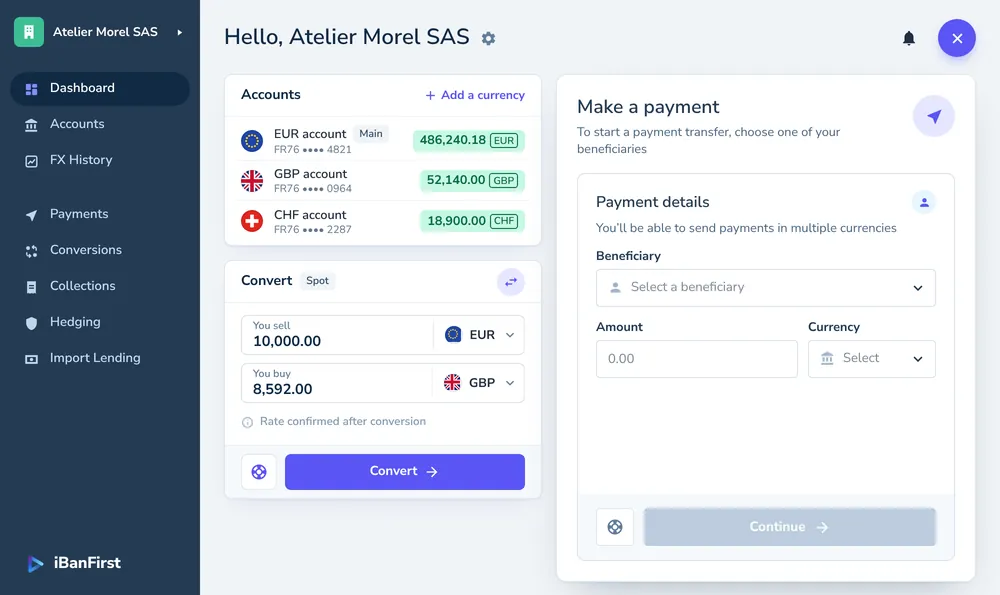
Hello, Atelier Morel SAS
Accounts
Total consolidated 5 accounts at today’s rates 970,080.03EUR
ConvertSpot
You buy21,480.00
1 EUR = 0.8592 GBP Live rate
Fee 12.50 EURValue date Oct 30, 2026
Rate confirmed after conversion
Payments
6 of 48 payments
Payment tracking Ref. PAY-2026-1030-0412
Porter & Quill LtdGB29 7741 · INV-2026-0412 · London 18,450.00GBPValue date Oct 30, 2026
CreatedOct 30, 09:12
ValidatedOct 30, 09:47
SentOct 30, 10:05
ReceivedEst. Oct 30, 15:30
With the correspondent bank in London. Expected on the beneficiary’s account by Oct 30, 15:30.
Debited fromMain EUR account Exchange rate1 EUR = 0.8592 GBP Debited amount21,473.46 EUR ChargesShared (SHA)
Status: Sent · Oct 30, 202618,450.00 GBP
The product at a glance, rebuilt for this page in the style of the screens of the time, with fictional data. It works: switch tabs, open a payment, convert an amount. Then take the tour of its pain points.

Pain points, before and after

The changes play on the screen above, the problem first and then the fix. Pick one to see it again.

The context: The product

iBanFirst lets businesses pay and get paid abroad, hold accounts in several currencies and manage their exchange risk.

I joined in 2020 as Senior Product Designer. The work was to add and improve features on the platform, and to understand better how clients used it.
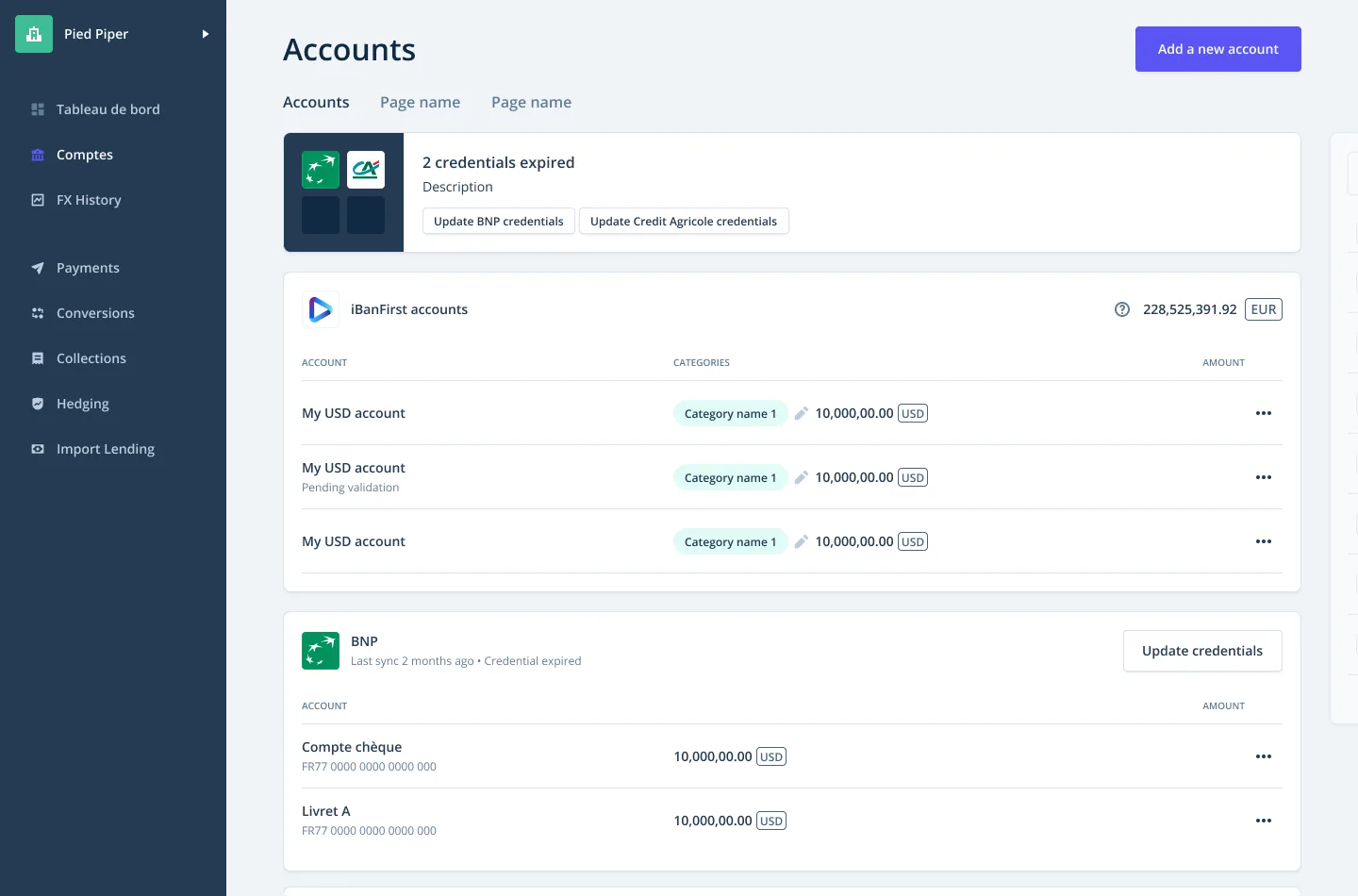
The Accounts page: a warning that two bank credentials have expired, the iBanFirst accounts with categories and amounts, then accounts held at another bank.
Accounts: the company’s iBanFirst accounts next to accounts held at other banks and linked to the platform, with a warning when their credentials expire.

The approach: Watching before changing

Before changing a journey, I watched it.

I analysed user journeys from Hotjar session recordings and heatmaps, tested changes as prototypes in Maze, four or five tests in all with 5 participants each, and ran 10 interviews. Improvements went out once users had validated them.

MethodWhat it tells
Session recordingsWhere people hesitate or give up, in the real product.
InterviewsWhy people do what they do.
Prototype testsWhether a change works, before it is built.

Here is that loop on a single question: paying in a currency the company doesn’t hold yet.

Make a payment

0:00 / 1:02
    A session recording and a prototype test, recreated for this page with a fictional client. Watch the recording, then switch to the prototype and make the payment yourself.

    Sorting what we saw

    Observations from recordings, interviews and tests went on one wall, then into themes.

    • What we saw
    • What got in the way
    • What they asked for

    Drag the notes, then sort them into themes.Sort the notes into themes.

    1. Getting to the first payment

      • Tries to pay before adding a beneficiaryRecording
      • Clicks a step that is not available yetRecording
      • Not sure the funding step is doneInterview

      What we took from it

      One clear action per step, in the order the client needs it.

    2. Which currency, which account?

      • Stops at the currency listRecording
      • Do I already have a dollar account?Interview
      • Tell me before it creates an accountTest

      What we took from it

      Say what will happen before it happens: an account in that currency will be created.

    3. Where is my money?

      • Adds up balances from two banks by handInterview
      • Can’t tell if the supplier has been paidInterview
      • One total, in eurosTest
      • Opens Payments to check one transferRecording

      What we took from it

      One balance across banks and currencies, and every payment followed step by step.

    4. Linked banks

      • Balances from the other bank stop updatingRecording
      • Didn’t know the bank connection had expiredInterview

      What we took from it

      Warn when a linked bank needs reconnecting.

    What the recordings, interviews and tests showed, recreated as an affinity wall for this page. Each note says where it came from.

    A client’s first weeks

    From the first transfer to the first statement: five steps, mapped from the onboarding checklist.

    1. Step 1Fund the account
      What the client does
      Sends money from the company’s usual bank
      What they wonder
      Which of our accounts do I send it from?
      How it feels
      +1 (from −2 (bad) to +2 (good))
      Where it hurt
      The step’s button says “Add your first beneficiary”
      What we changed
      One action per step, named after the step
    2. Step 2Add a beneficiary
      What the client does
      Enters the supplier’s bank details
      What they wonder
      What details do I need?
      How it feels
      0 (from −2 (bad) to +2 (good))
      Where it hurt
      Step numbers skip, and steps that are not open yet look like buttons
      What we changed
      Steps numbered once, in order; locked steps look locked
    3. Step 3Make a first payment
      What the client does
      Chooses an amount and a currency
      What they wonder
      Do I already have a dollar account?
      How it feels
      −2 (from −2 (bad) to +2 (good))
      Where it hurt
      Nothing says what happens when you pay in a currency you don’t hold
      What we changed
      A note: an account in this currency will be created
    4. Step 4Simulate a hedge
      What the client does
      Simulates cover against currency risk
      What they wonder
      What is a hedge, and do I need one?
      How it feels
      −1 (from −2 (bad) to +2 (good))
      Where it hurt
      “Simulate a hedging”: jargon, and a typo
      What we changed
      Plain words, and what the simulation gives you
    5. Step 5Get an account statement
      What the client does
      Downloads a statement for the accountant
      What they wonder
      Where do I find it?
      How it feels
      0 (from −2 (bad) to +2 (good))
      Where it hurt
      “Generate an extract” twice, described as a payment
      What we changed
      One step, with its own description

    The onboarding journey as a journey map, recreated for this page from the checklist’s real steps. The feelings curve is illustrative.

    First steps

    New clients were guided to their first payment by a checklist. Captured at the time, it showed small faults that add up.

    Fund the account from the company’s own bank, add a first beneficiary, make a first payment, then simulate a hedge against currency risk.

    1. The funding step’s button says “Add your first beneficiary”.

      FixEvery step’s button names that step’s own action.

      Before · capture 1
      Capture 1, detail: the funding step, in blue, carries the button “Add your first beneficiary”.
      After · rebuilt
      OnboardingWe will guide you to set up your account
      1. Fund your accountTransfer money from an account in your company’s name at your usual bank.
      2. 2
        Add your first beneficiaryYou need a beneficiary before you can make a payment.Add a beneficiary
    2. The numbering jumps from 1 to 3.

      FixSteps numbered once, in order, from 1 to 5.
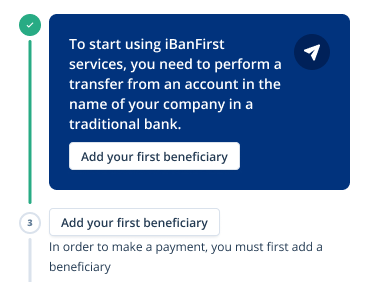
      Before · capture 3
      Capture 3, detail: after the first step, ticked, the next one is numbered 3.
      After · rebuilt
      1. Fund your accountTransfer money from an account in your company’s name at your usual bank.
      2. 2
        Add your first beneficiaryYou need a beneficiary before you can make a payment.Add a beneficiary
      3. 3
        Make your first paymentPay a beneficiary, in any currency.
    3. Steps that aren’t open yet look like buttons.

      FixLocked steps show a lock, and no button until they open.

      Before · capture 2
      Capture 2, detail: steps 3 and 4, not open yet, look like grey buttons, “Make a first payment” and “Simulate a hedging”.
      After · rebuilt
      1. 3
        Make your first paymentPay a beneficiary, in any currency.
      2. 4
        Simulate a currency hedgeSee how a hedge protects your margins from exchange-rate swings.
    4. “Simulate a hedging”: jargon, and a grammar slip.

      Fix“Simulate a currency hedge”, with one line on what it gives you.

      Before · capture 2
      Capture 2, detail: step 4, “Simulate a hedging”, described as “Creation of your foreign exchange risk management strategy”.
      After · rebuilt
      1. 4
        Simulate a currency hedgeSee how a hedge protects your margins from exchange-rate swings.
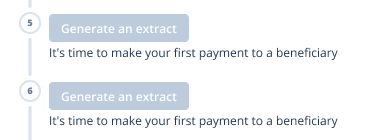
    5. “Generate an extract” appears twice, described as a payment.

      FixOne step, “Download a statement”, with its own description.
      Before · capture 2
      Capture 2, detail: steps 5 and 6 are both called “Generate an extract”, with the description “It’s time to make your first payment to a beneficiary”.
      After · rebuilt
      1. 5
        Download a statementGet a statement of your accounts for your accountant.
    Five faults found on three captures of the checklist from the time. For each, the detail of the capture that shows it, then the same part of the corrected checklist, rebuilt for this page.

    The solution: Making a payment

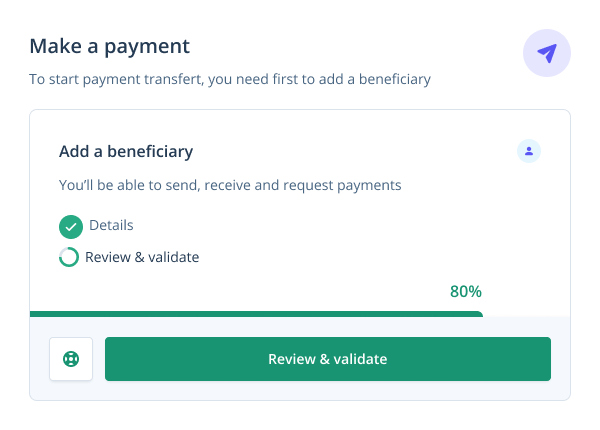
    The payment flow opens from the dashboard, in a panel that shows where you are.

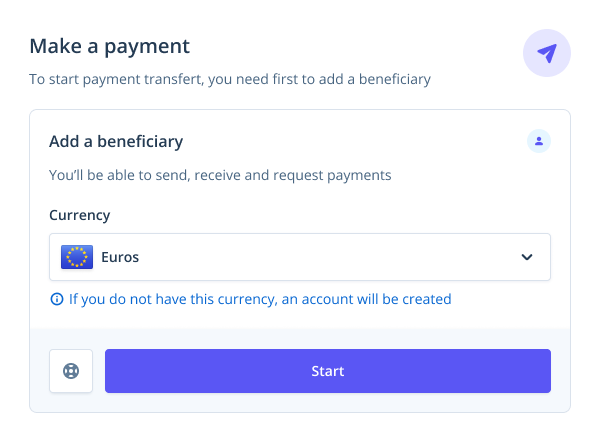
    The panel shows each step and its progress. If you pay in a currency you do not hold yet, it tells you an account in that currency will be created.
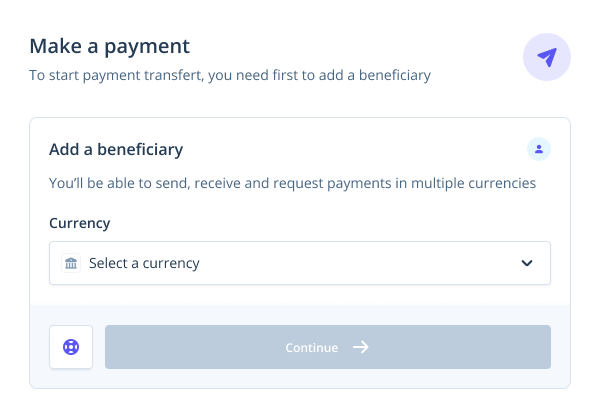
    Empty. Add a beneficiary first.
    EmptyAdd a beneficiary first.
    Filled. Euros chosen; a note says an account in that currency will be created if needed.
    FilledEuros chosen; a note says an account in that currency will be created if needed.
    In progress. Details done; review and validate are left.
    In progressDetails done; review and validate are left.
    The real payment panel in three states.

    iBanFirst — Payments

    The design file of the payment flow: six frames in order, from the dashboard to the validated payment, with the prototype connections that link each control to the next frame.

    1. 01 Dashboard01 Dashboard
    2. 02 Dashboard / Create menu02 Dashboard / Create menu
    3. 03 Payment / Details03 Payment / Details
    4. 04 Payment / New currency04 Payment / New currency
    5. 05 Payment / Review05 Payment / Review
    6. 06 Payment / Validated06 Payment / Validated
    1. Payment flow01 Dashboard · 02 Dashboard / Create menu · 03 Payment / Details · 04 Payment / New currency · 05 Payment / Review · 06 Payment / Validated

    The design file of the payment flow: six frames in order, from the dashboard to the validated payment, with the prototype connections that link each control to the next frame.

    The payment flow as it lived in Figma, recreated from the screens above: the frames in order, and the prototype links between them.

    The design system

    I contributed to iBanFirst’s design system, then evolved it as Lead.

    The payment flows are built from shared components: amounts with their currency, payment statuses, steps, alerts, account rows.

    The shared library I contributed to, then evolved as Lead. Shown here: the components behind the payment flows.

    iBanFirst design system

    • Foundations
      • Colours
      • Typography
      • Spacing
    • Components
      • Amount field
      • Payment status
      • Stepper
      • Account row
      • Alert
      • Button

    Components / Amount field

    USD
    Exchange rate
    1 EUR = 1.0842 USD
    Converted
    9,223.39EUR
    Fee
    5.00EUR
    Debited from your EUR account
    9,228.39EUR
    Controls

    Amount field

    A currency, then an amount. The rate and the fee are shown before anything is confirmed.

    Do

    • Show the currency before the amount.

    Don’t

    • Reveal the rate only after confirmation.

    Components of the payment flows, recreated for this page in iBanFirst’s style. Change their properties and read their rules.

    Decisions that shaped it

    Three choices made the difference.

    1. Watch real sessions before redesigning.

      Why
      Recordings show where people hesitate or give up in the real product; interviews say why.
      What it led to
      Changes tested as prototypes with users, and shipped once they had validated them.
    2. Fix the small faults of the first steps.

      Why
      A new client’s first weeks decide whether the platform becomes a habit, and small faults add up.
      What it led to
      A map of the first weeks and an audit of the onboarding checklist, fault by fault.
    3. Say it before the system does it.

      Why
      Paying in a currency the company doesn’t hold yet creates an account in that currency.
      What it led to
      A payment panel that says so before you pay, and shows each step and its progress.

    The result: Becoming Lead

    In 2021 I became Lead Product Designer (UX/UI).

    I evolved the design system I had been contributing to, ran design operations day to day, and shipped key launches with product managers and engineers, validated with users along the way. The same year I moved from Paris to Bordeaux and kept working remotely, with occasional trips to the Paris office.

    In October 2021 I joined Ogury as Lead Product Designer.