Mogette · Chapter 1
The week’s menu
Two settings, one button, meals for the whole week.
On shopping day I stand outside the shop and want to know what to buy for the days ahead. The app asks how many days, how I cook and what matters, then picks the dishes that cost least per portion with this week’s deals.
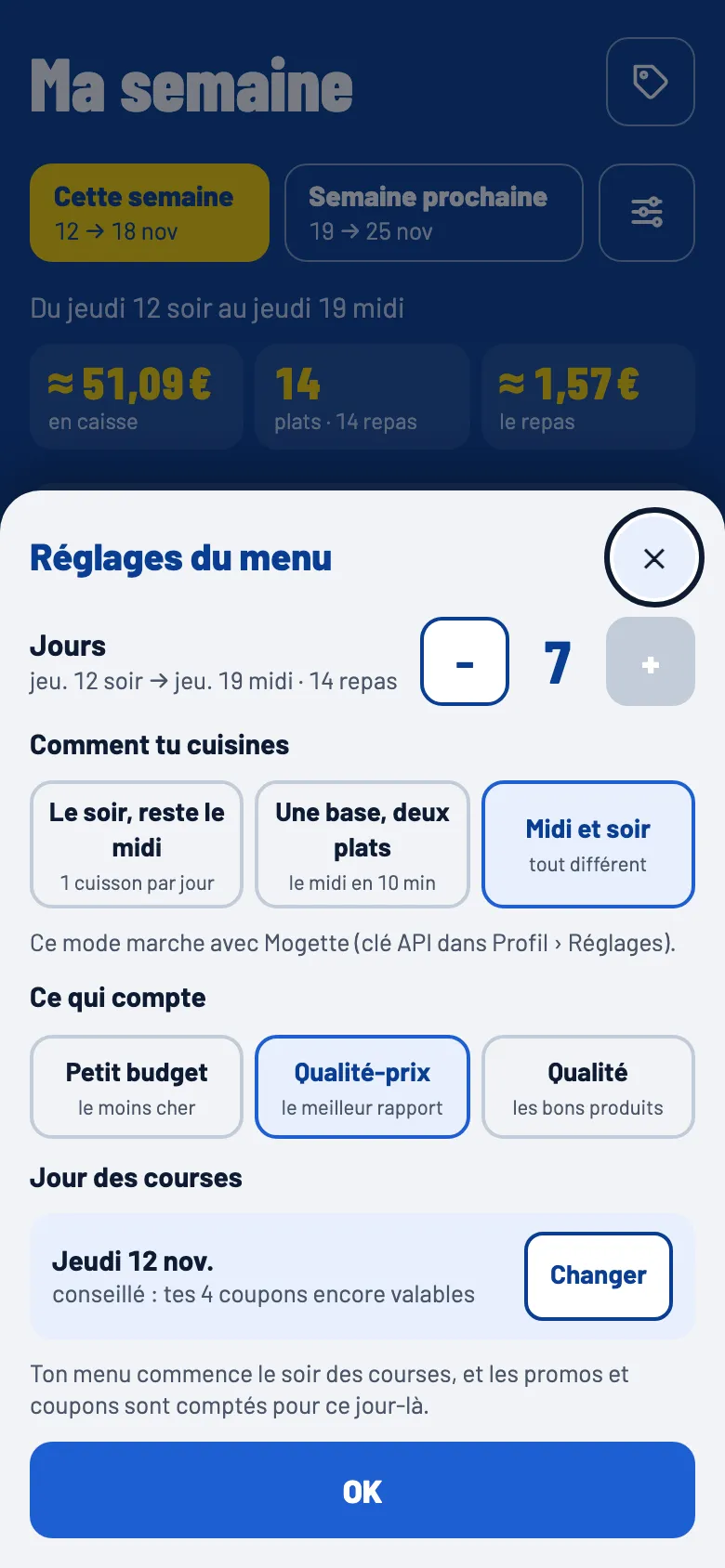


Two questions, not a form
The first version asked for a starter, a main and a dessert for every meal. I could not follow it myself. Two questions and one button are left.
| Days | From 1 to 7, from the evening of shopping day to the lunch of the last day. The screen shows the dates and the number of meals. |
| How you cook | “Dinner, leftovers for lunch”: one cooking a day, the second portion is lunch. “One base, two dishes”: lunch takes 10 minutes with half of last night’s base. “Lunch and dinner”: a different dish at every meal. |
| What matters | Tight budget, value for money or quality. A tight budget leaves out expensive products even on offer: salmon, beef, prawns. |
| Shopping day | Thursday by default, because the Lidl deals week starts that day. The week gets ready by itself that morning. |
Products before dishes
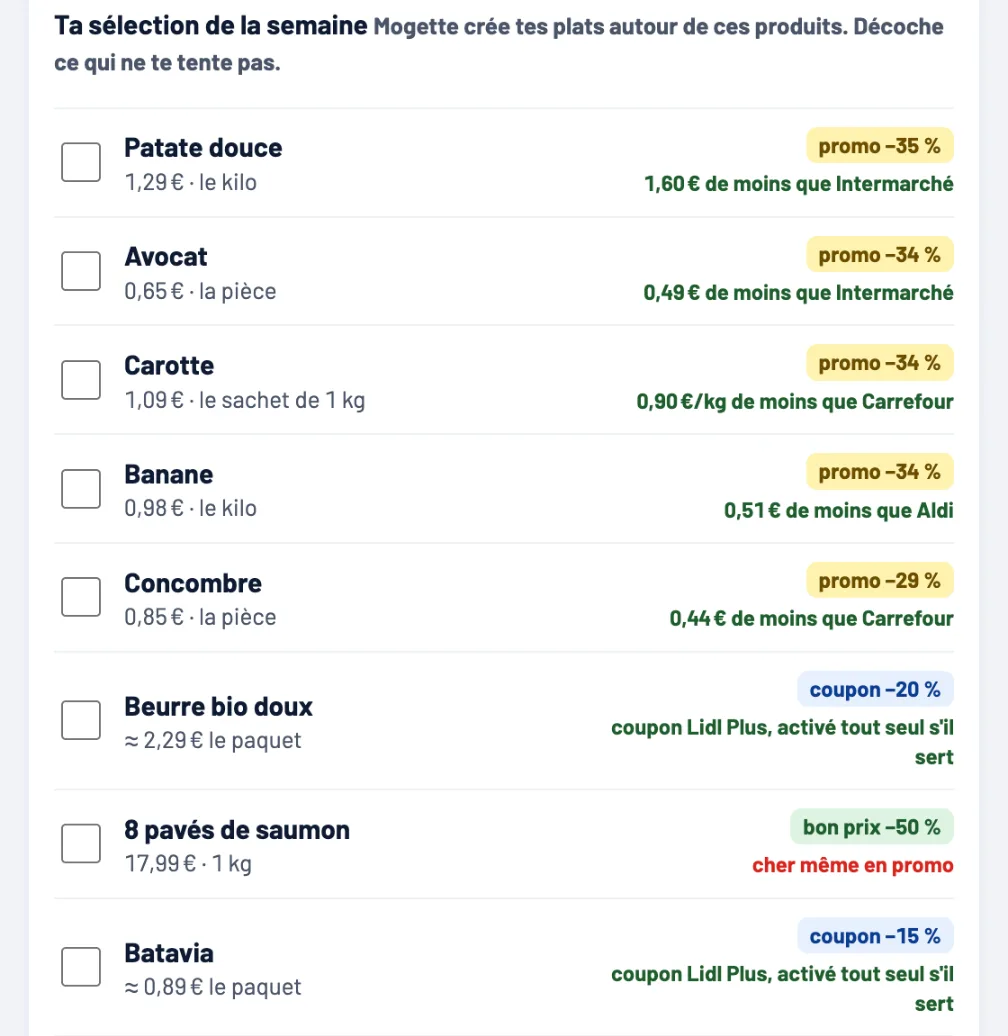
Before it builds the menu, the app shows the week’s selection: the deals worth having, each with its verdict. I untick what I don’t fancy, and Mogette builds the dishes around the rest.
Each line says where the discount comes from (a deal, a Lidl Plus coupon, a good price) and compares it with the cheapest known chain: “€1.60 less than Intermarché”. A product still expensive despite the deal says so too. Coupons that no dish needs stay apart, one tap from the list.
The real cost of a portion
Dishes are chosen by what a plate costs, not by what the offer takes off.
For each recipe, the app counts the whole packs to buy, not just the grams used, plus a share of the pantry (oil, rice, spices) that will need buying again one day. It plans how to finish an opened pack in another dish of the week: the coconut milk from the curry goes into the dahl, a 1.2 kg squash feeds a soup and a risotto.
An expensive dish on offer no longer beats a cheap dish that is not. A protein floor per portion keeps the menus balanced; price decides the rest. Each recipe shows the nutrients of a portion, estimated from the French Ciqual table.
Outside the deals, prices come, in this order, from my receipts, the prices I typed, Lidl’s normal price seen in a past offer, then a table of Lidl prices to check on the shelf. Otherwise the app says “price unknown” rather than invent one.
The Mogette assistant
The recipe book has 59 hand-written recipes. When that is not enough, the Mogette assistant, which runs on Claude, writes dishes around the offers I kept.
It gets the week, the chosen offers with their prices and pack sizes, what I have at home and what I do not eat. If I remove an ingredient, only the dishes that use it are redone: it swaps the ingredient for an equivalent on offer or already in stock, and a version that still contains it is refused.
Invented dishes say “Recette de Mogette” on their page. In the demo the assistant is not connected: the button uses the recipe book.
For the Monsieur Cuisine
I have a Monsieur Cuisine cooking robot. 47 recipes in the book have a version for it: each step with its time, temperature, speed and reverse mode when needed.
The maker offers no public way to add recipes. A small script in my browser adds them to my account, from my own session, as if I typed them. From the phone, the “send my dishes to the robot” button goes through Home Assistant, which sends a notification to my Mac to start the upload.
Each step shows the quantities to weigh for the ingredients it names, the first time it names them, scaled when I cook more than two portions. For the robot, each ingredient that goes into the bowl gets its own step on the robot’s built-in scale before the step that uses it.